Welcome Page
Mocabulary = More Vocabulary

Well any, really. It could be that you wish to enlarge your vocabulary in your mother language, learn the meaning of terminology* in a subject you are studying, learn words in a foreign language, anything, where you have to learn the meaning or definition of a word or term.
| Subject | Term | Definition |
|---|---|---|
| English | terminology* | the body of terms used with a particular technical application in a subject of study, theory, profession, etc. | English | revision* | rereading work to improve one's knowledge of a subject, typically to prepare for an examination |
| Biology | photosynthesis | the process by which green plants and some other organisms use sunlight to synthesize nutrients from carbon dioxide and water |
| French for English speakers | le champignon | the mushroom |
| English for Dutch speakers | loquacious | spraakzaam |
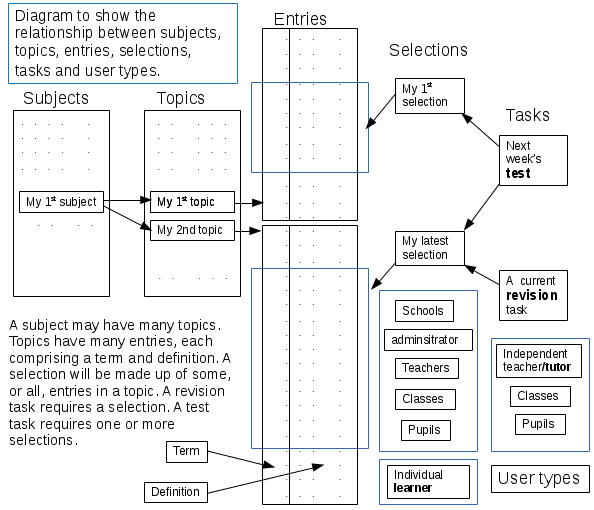
You build a vocabulary you wish to learn organised by subject and topic. The topics can form a lexical set. You make selections from the topics of words you wish to learn at any one time. Then make revision* tasks and tests to learn the words in the selection and to test your knowledge. The revision tasks make use of spaced learning, or spaced repetition, a process in which you review the words repeatedly with longer gaps between each review to reinforce your knowledge. You will receive periodic emails for each revision task to remind you when to review the selection.
You can review the selections by reading them or listening to them. You can test your knowledge at any time with a variety of automated tests. You can build selections from subject and topic lists shared by other learners (to do). The aim is simply to make it as easy as possible to enlarge your vocabulary. Some subjects, called global subjects, as they are available to all users, have been created along with a range of topics within each subject. You cannot change these subjects, their topics or terms, but you can make your own selections from any of the topics. You can then use these selections to set up revision and test tasks.
- An individual learner: people wanting to enlarge their vocabulary
- An individual teacher or tutor: add or import a list of your pupils and classes, manage their learning by building subject, topic lists and selections, set revision and test tasks for whole classes, monitor progress
- A school: import teachers, pupils, classes and subjects from your school MIS. Your teachers can then do all that an individual teacher can. Share subjects, topics and selections by department. Monitor progress across the school (to do).
If you have an account, log in and start. If not, click on the drop down menu next to the log in button in the top bar and select ‘sign me up’. Just go for it! Help is available via the 'Getting started' instructions below.
Getting started
To use the system you need to register or sign up. In the bar at the top, use the dropdown entitled log in or click here to view the options. Select 'Sign me up'. You will be asked for your first name, last name, email address and user type. The email address must be functional. To check, a validation email will be sent to that address which will include a link to confirm the address and the creation of your account. There are two user types you can choose:- learner - you intend to use the system to learn new vocabulary or terminology yourself
- tutor - you intend to supervise the teaching of other individuals as an independent teacher (not part of a school or organisation using this web site).
Copyright © 2016 - 2025 mocabulary.eu
Page rendered in 0.0030 seconds